Entry: System, list view
F/M: No
Mnemonic: None
Screen: Loans > Collections > Queues > Collection Queues
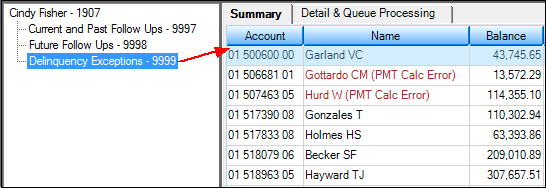
The Collection Queues list is on the left side of the screen and displays the collection queues for the selected employee. Click on any of the listed queues and all accounts in that queue will be displayed on the Summary tab to the right (see example below).
Sorting
On the Summary tab, you can sort the list view as you normally would by clicking on the heading you want to sort by. For example, click on Balance to sort by the principal balance; click on the same heading again to reverse the order (high-to-low balance or low-to-high balance). However, when you leave the screen, the sort returns to the original sort.
Note: Changing the sort does not affect the processing of the queueCit will progress through accounts based on the original sort.
Changing Employee Queues
Click the  button to display the collector queues for another employee. This accesses the Processing Number box, where you can enter a different employee number. An example of when you might want to change employee queues would be if a manager wants to assess different employees’ queues. See the Changing Queues and Totals topic for more information.