The Comments tab is where collectors and employees will record their collection efforts. This tab allows collectors to enter comments or actions taken on the delinquent loan. It records these entries and creates an online history of actions taken on the loan. This way collectors and managers can track the progress of actions taken on the loan.
NOTE
Once comments have been entered, they cannot be deleted. This is suggested by auditors for security purposes. |
This tab is located on several CIM GOLD screens. They include the Account Delinquency screen; Bankruptcy Information screen; Foreclosure & Repossession & Judgment screen; and the Detail & Queue Processing tab on the Collection Queues screen. See the following example of this tab:
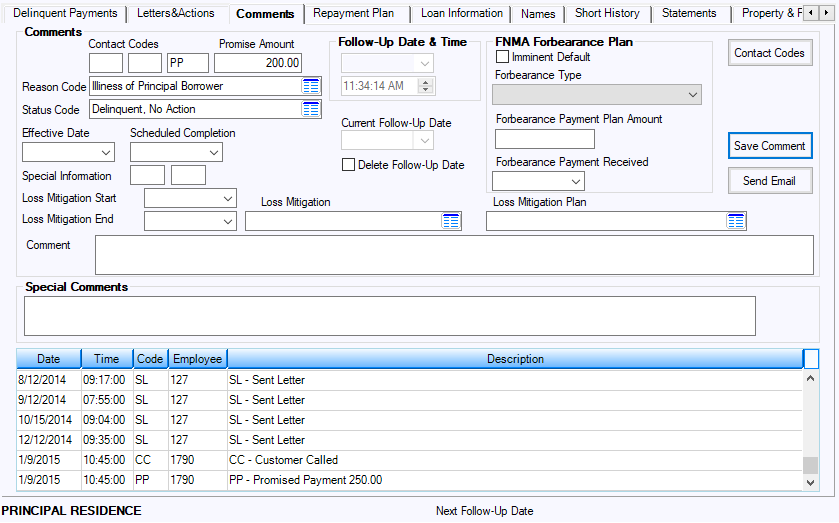
Clicking the  button will bring up a list of available comment codes and descriptions. To print the list, right-click and use the printing options that appear. You can sort the list by code or description by clicking on the column headings.
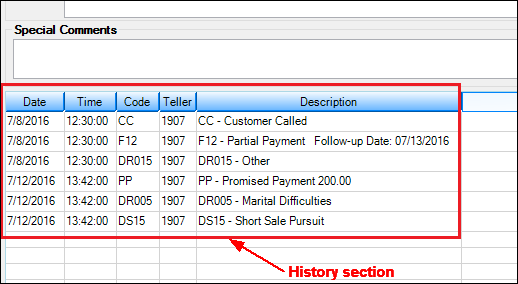
Click the  button or press <Enter> to save any information you have entered. This information is then stored in the History section (see example below), along with the date, time, comment code, description, and employee number of the person who entered the comment. Note: Once comments have been entered, they cannot be deleted.
To send an email to a borrower:
1.On the Comments tab, select the name of the borrower in the top list view that you want to send the email to.
2.Click  . A dialog box will appear with the To and From email addresses automatically populated, as shown below.
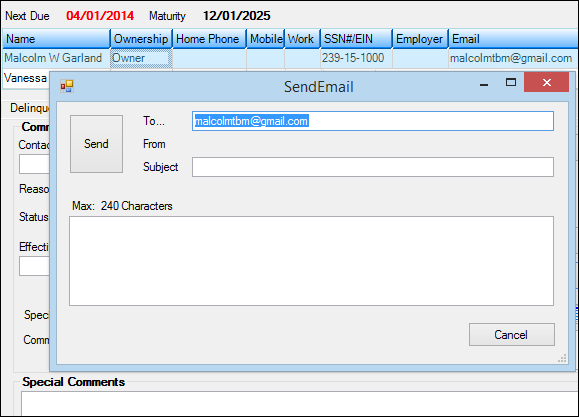
•The borrower's email address is pulled from the CIS record. If an email address has not been entered in CIS, you can manually enter the email address in the To field.
•The collector's email address is pulled from the Email Address field on the System > Setup screen > Employee tab.
3.Enter the subject of the email in the Subject field.
4.Enter the message (up to 240 characters, including spaces).
5.Click <Send>.
A history of the email is shown in the Comments list view. The date, time, code (EMAIL), employee number, and the borrower email address are stored on one line; the actual message is stored on a separate line, as shown in the following example:

Note: If a borrower responds to the email, the response is delivered directly to the collector’s inbox; it is not linked to, or stored in, Collection history.
SETUP WARNING
Before you can send emails from the Collection system, template 196 must be created. This is done by the FPS GOLD Web department. This can be set up to display your institution's specific email disclosure, such as a privacy disclosure.
Before the collector can send an email, the employee's (collector's) email address must be set up on the Security > Setup screen, Employee tab. This is the address used when the collector sends an email from the Collection system. |
Field Descriptions
See the following links to descriptions of fields on the Comments tab:
Follow-Up Date & Time field group
FNMA Forbearance Plan field group
Forbearance Payment Plan Amount