The Loan Information tab on the Account Delinquency screen displays basic loan information concerning the displayed account. You cannot make changes to fields from this tab. Information for these fields is pulled from other places in CIM GOLD.
See the following example of this tab, followed by descriptions for each of the fields:
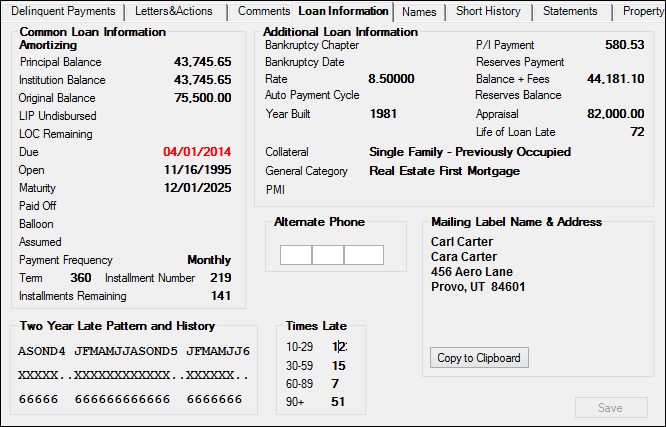
Loans > Collections > Account Delinquency Screen > Loan Information Tab
Common Loan Information
This field group displays common loan information, and is also displayed on the Delinquent Payments tab of the Loans > Collections > Account Delinquency screen. See the Common Loan Information field group topic.
Additional Loan Information
This field group displays additional loan information, such as any bankruptcy proceedings, interest rate, payment information, and more. See the Additional Loan Information topic for more information.
Alternate Phone, Mailing Label Name & Address, Times Late
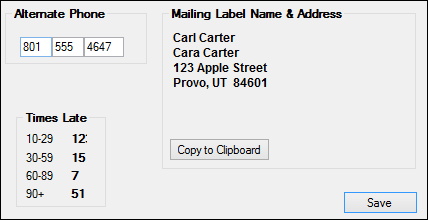
The Alternate Phone, Mailing Label Name & Address, and Times Late field groups show personal information for this loan account borrower, as well as how many times they have been late making their payment. See the following example of these fields, followed by descriptions:
Field |
Description |
||||||||||||||
|---|---|---|---|---|---|---|---|---|---|---|---|---|---|---|---|
Alternate Phone
Mnemonics: QACPHA, QACPHP, QACPHN |
This field is available for the collector to enter an additional phone number if needed. Here you can enter phone numbers that customers may give as alternate phone numbers where they can be reached, such as a car phone, relative’s number, etc.
Entering information in this field does not feed back to CIS. |
||||||||||||||
Mailing Label Name & Address field group |
This field group displays the name and address information that is set up for this account’s mailing label. Up to six lines are displayed.
If there is a mail restriction such as "Do Not Mail," it will be displayed. Restrictions are set up on the CIS > Entity Maintenance - Mailing Label screen for the account.
You can copy and paste the mailing information by completing the following steps:
|
||||||||||||||
Times Late
Mnemonics: LNLT10, LNLT30, LNLT60, LNLT90 |
These fields store the number of times, over the life of the loan, a payment was paid in that range of days past the due date. The ranges are 10-29, 30-59, 60-89, and 90 or over. Although these fields are file maintainable, the system automatically updates these fields as follows:
Special Notes
If a late charge is assessed for a zero amount (grace days are set up but there is no late charge rate or code), the days late field will still be updated. If the Grace Days field on the Loans > Account Information > Fees & Late Charges & Penalties screen > Late Fees tab is blank, no late charges will automatically be assessed; therefore, the days late field will not be updated as a result of a late charge assessment. However, when a payment is posted, the days late field is increased by 1 at that time.
The days delinquent fields work in conjunction with the Total Times Late field on the Loans > Account Information > Fees & Late Charges & Penalties screen > Late Fees tab. However, if the number of grace days is less than 10 and a late charge is assessed, only the Total Times Late field will be updated. The 10-29 Days field is not updated because the assessment was less than 10 days. In this case, the total in the Total Times Late field will not be equal to the total of all the 10-29, etc. ranges added together.
If a payment is reversed, the appropriate days late field (10-29, etc.) is reduced by 1.
If a late charge is waived (tran code 570), the Total Times Late field is reduced by 1. In addition, if the 10-29 days field is greater than zero, it is reduced by 1. If the 10-29 days field is zero, the program checks the 30-59 days field and, if it is greater than zero, it is reduced by 1. If the 30-59 days field is zero, the same process continues for the 60-89 days field and 90+ days field.
All file maintenance to the days late fields is displayed in Loan History in both the late charge assessment and the payment transaction. |