|
Creating a Pacs.008 Customer Credit Transfer Wire (Domestic and International) |
  

|
Navigation: Creating ISO Wires >
Creating a Pacs.008 Customer Credit Transfer Wire
(Domestic and International)
|
Creating a Pacs.008 Customer Credit Transfer Wire (Domestic and International) |
|
A Customer Credit Transfer wire (pacs.008) can be created with the following Local Instrument Codes:
|
|
Replaces FAIM |
|
Local Instrument Code |
|
Business Function Code |
Type Code |
CTRC |
Core Customer Transfer |
CTR, CTP |
1000 |
CTRD |
Customer Drawdown Transfer |
DRW |
1032 |
CTRS |
Special Account Customer Transfer |
CTR, CTP |
1500 |
1.Click <+ New Wire/Template>. .
2.Select the Department, Function, and Local Instrument, then click <Next>. .

3.Enter the Instructed Agent information and the Amount. (Instructing Agent is defaulted with your institution.)

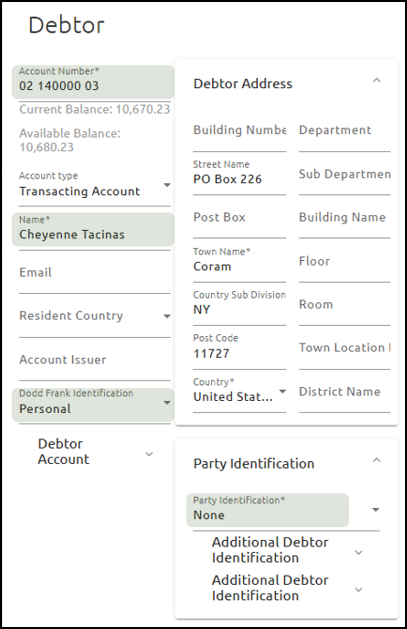
5.Enter the Debtor Account Number, Name, Address, Dodd Frank Identification (required). Also enter the Party Identification if needed.
Your core may auto-populate data when you select an account-name combination. Dodd Frank Identification for international wires triggers a Dodd Frank notice when the value is set to “Personal.” This may be auto-populated from the core when the Name Account pair is selected, if available.
6.Enter the Creditor Account Number, Name, Address (required). Also enter the Party Identification if needed.
For the address, the Town Name and Country are required; the other fields are optional.
