|
How to Create a Tax Wire in EFT GOLD |
  

|
Navigation: Creating ISO Wires >
How to Create a Tax Wire in EFT GOLD
|
How to Create a Tax Wire in EFT GOLD |
|
To create a Tax Payment wire:
1.Select the Pacs.008 TAX Wire Function Type.
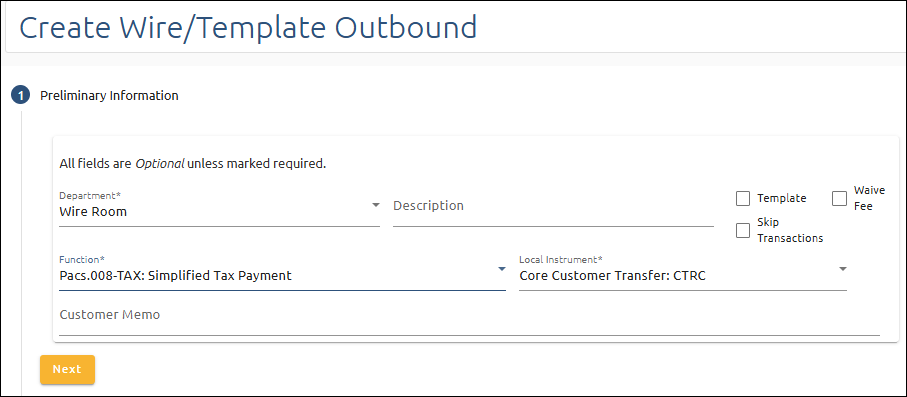
2.Enter the tax Amount (including interest): $0.01 to $9,999,999,999.99.

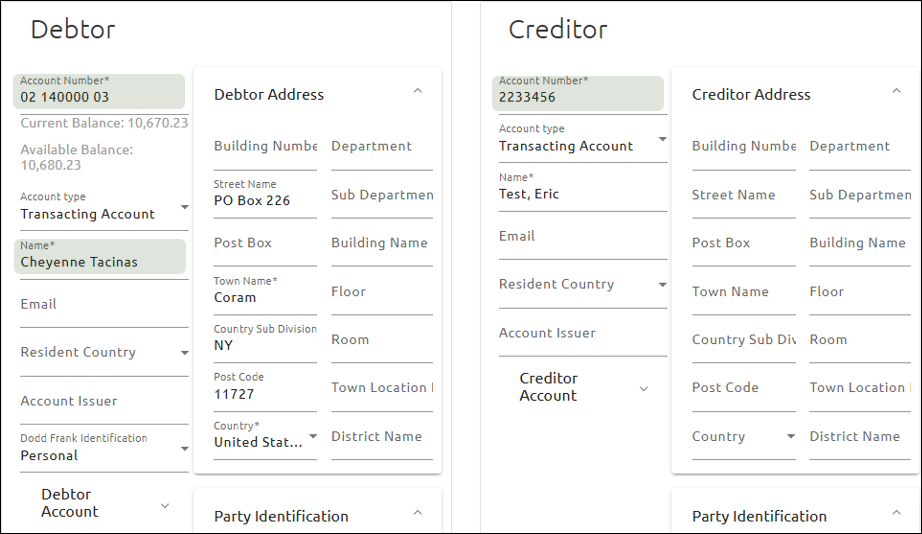
3.In the Debtor fields, enter the account the funds will be debited from and select the Taxpayer name.
4.In the Creditor fields, enter the taxpayer name as follows:
oFor Business – Enter the Business name as it shows on the account.
oFor Consumers – Enter in the following format: Last Name, First Name. See the example below.
5.Click the  button to add a Structured Remittance Information record.

6.Expand the Tax Remittance Fields by clicking the expander icon  .
.
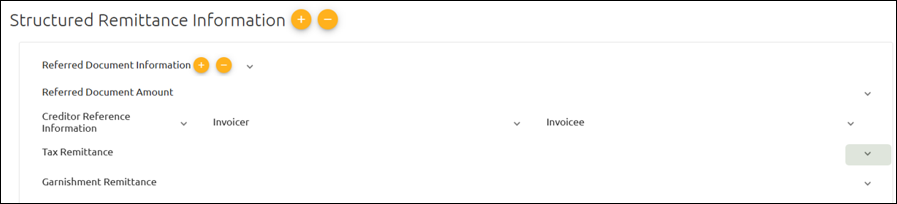
7.Expand the Creditor field group and enter the 9-digit Tax Id Number in the Tax Identification field. Numbers cannot be “000000000” or “999999999.”
8.Click the button next to Record to open a tax record.

9.In the Type field, enter the five-character alphanumeric tax type code (e.g,. “1040A”).
10.Expand the Period fields by clicking the expander icon .
11.In the Year field, enter the tax year in YYYY format (e.g, “2026”).
12.In the Type field, select “Twelfth Month (12)”.
13.In the Additional Information field, enter any desired information (optional).
14.Click  or
or  .
.
Once the wire is approved, it will be sent.