|
Using Reports |
  

|
Navigation: »No topics above this level«
Using Reports
|
Using Reports |
|
To access reports, select “Reports” from the EFT GOLD Menu. Your institution sets up the reports as needed. For details on setting up reports, see the following section, Creating Reports
You can search for reports or sort the list by the Name or Description column headers.

Icon |
Button Name |
Explanation |
|
View Report |
Run and display the report. |
|
Edit Report Options |
Open the report options for editing. |
|
Download Report |
Download the report to open in an application that uses a CSV file, such as Excel. |
|
Delete Report |
Choose this action to delete the selected report(s). |
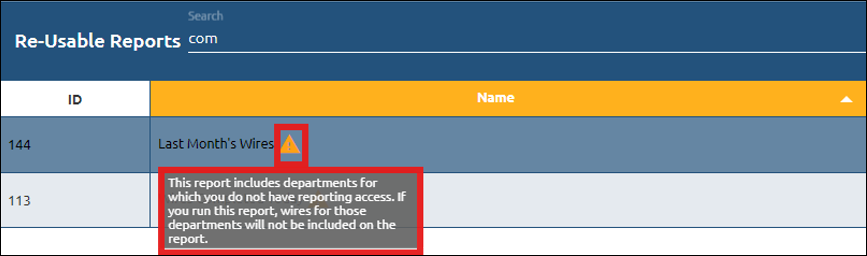
If a report includes wires information for a department that the user does not have security to view, the following warning will appear by the report name: “This report includes departments for which you do not have reporting access. If you run this report, wires for those departments will not be included on the report.” See the example below.
The report can still be run, but only those wires for which the user has reporting access to will show on the report.