|
Creating a Pain.013 Drawdown Request Wire |
  

|
Navigation: Creating ISO Wires >
Creating a Pain.013 Drawdown Request Wire
|
Creating a Pain.013 Drawdown Request Wire |
|
A Customer Drawdown Request wire (pain.013) can be created with the following Local Instrument Codes:
|
|
Replaces FAIM |
|
Local Instrument Code |
|
Business Function Code |
Type Code |
DRRC |
Customer Drawdown Request |
DRC |
1031 |
DRRB |
Bank Drawdown Request |
DRB |
1631 |
1.Click <+New Wire/Template>.
2.Select the Department, Function, and Local Instrument, then click <Next>. .

Creditor Agent
3.Enter the routing number of the institution where the Creditor’s Account Number resides (your financial institution’s Routing Number).
Unless you originate wires for other financial institutions, this will always be your institution information.

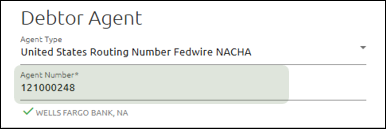
Debtor Agent
4.Enter the routing number of the institution where the Debtor’s Account Number resides.
5.If the Debtor Agent uses a correspondent bank, enter the correspondent bank’s routing number in the Agent Number field.
Creditor
6.(DRRC) Enter the Creditor’s Account Number, Name, Address, and Party Identification.
•Party Identification for international wires triggers a Dodd Frank notice.
•Your core may auto-populate data when you select an account-name combo.
7.(DRRB) Enter
•Your core may auto-populate data when you select an account-name combo.
•Party Identification for international wires triggers a Dodd Frank notice.

Debtor
8.(DRRC) Enter the Debtor’s Account Number, Name, Address, and Party Identification as needed.
Town Name and Country are required; the rest of the address is optional.
9.(DRRB) Enter the Debtor/Receiving Institution’s Account Number, Name, Address, and Party Identification as needed.
Town Name and Country are required; the rest of the address is optional.
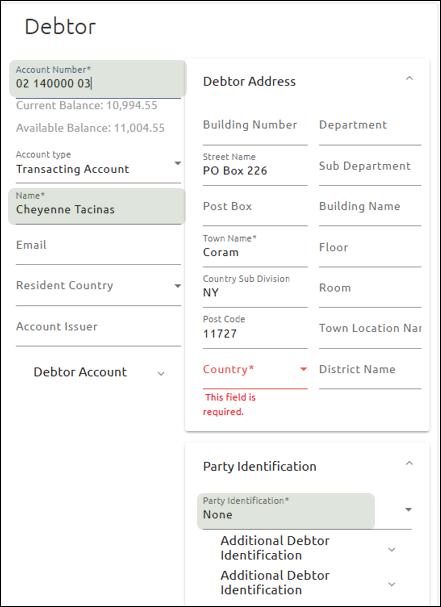
10.When the Debtor Agent is a correspondent bank, enter the routing number of the institution where the Debtor’s Account Number resides in the Account Number field and the institution name in the Name field.
Ultimate Debtor
11.Under the Ultimate Debtor heading, click the expander icon  to open the fields.
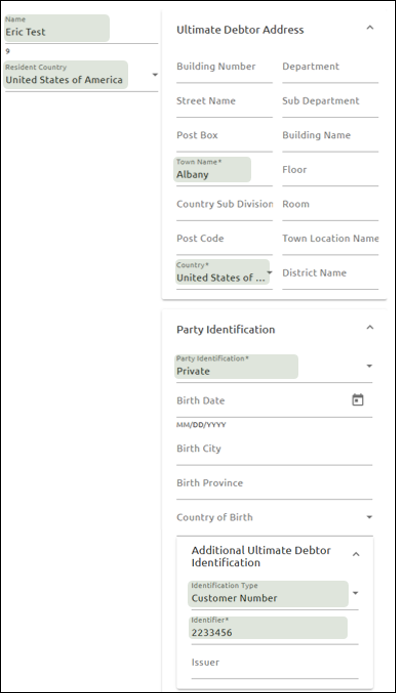
12.Enter the consumer or business name in the Name field and select the Resident Country.
Ultimate Debtor Address
13.Enter the Town Name and Country of the Ultimate Debtor.
Party Identification
14.Select “Private.”
Additional Ultimate Debtor Identification
15.Select “Customer Number” for the Identification Type.
13.Enter the account number from which the funds should be debited in the Identifier field.
Initiating Party
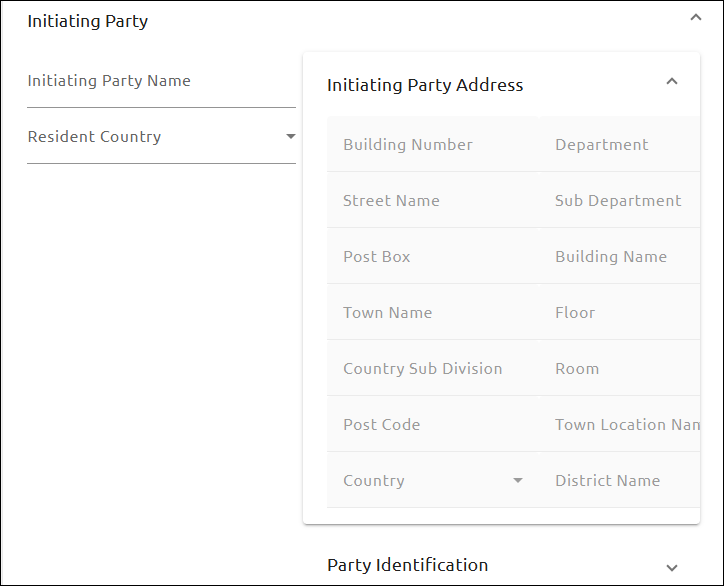
17.Enter the name of the person or company that requested the drawdown in the Initiating Party Name field.
18.Select the Resident Country of the initiating party.
Initiating Party Address
19.Enter the address of the Initiating Party. Town Name and Country are required; the rest of the fields are optional.
This information will be defaulted from the Creditor information.
Unstructured Remittance Information
20.Enter the Originator to Beneficiary Information in this field.
If Structured Remittance Information is used, this option will be unavailable.

Structured Remittance Information
21.Enter Structured Remittance Information as requested. You are limited to one structured record.
If Unstructured Remittance Information is used, this option will be unavailable.
Release Time
22.Accept the default value in the Release Method field.
Please consult your internal policies and procedures before making changes to the default value. The release time cannot be edited after the wire is created.

23.Click <Create Wire> or <Create and Submit Wire>. .
Once the wire is approved, it will be sent.