Setting Up Deployment Options |
  

|
Navigation: GOLDDeploy Agent >
Setting Up Deployment Options |
|
This section explains how to set up deployment options for your workstation.
Use the GOLDDeploy Agent Configurator for the following two tasks:
| • | to set up your options |
| • | to start and stop the service that does the actual downloading and installation |
NOTE
The Agent Configurator will ask for Administrator rights in order to run. |
To set up deployment options:
1.In the start menu, click the GOLDDeploy Client icon.

The GOLDDeploy Configurator screen opens.
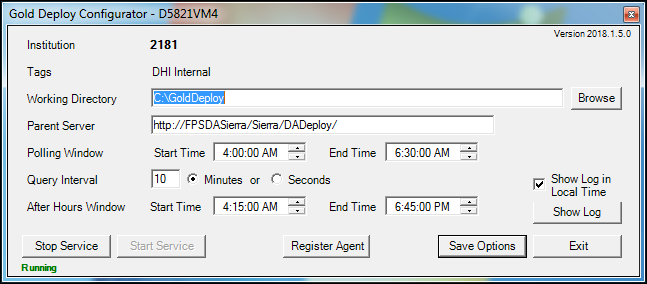
2.Enter information in the fields. See Available Options below for information on the fields.
3.When you have finished, click <Save Options>.
The following list explains the information at the top of the GOLDDeploy Configurator screen. This information can't be changed on this screen.
| • | Computer’s identity (on the title bar—D5821VM4 in the example above). This will be the name of your workstation as it is known to the network. |
| • | Your Institution number. |
| • | Tags associated with this Agent Target machine. Note: A system administrator can change these tags on the Target Machines tab. |