Getting Started |
  

|
Navigation: Dashboard > Executive Dashboard >
Getting Started |
|
Before you can use the Executive Dashboard, your institution must be set up to use FPS GOLD's sequel database, VitalView GOLD. If your institution is not already set up to use VitalView GOLD, contact customer service.
Once your institution is set up with VitalView GOLD, a user at your institution with Security Administrator authority must add one or more users to the appropriate system profiles in CIM GOLD Security Setup so that those users can view or change the tiles within the Executive Dashboard.
Adding Authorized Users to System Profiles
CoreView GOLD users must belong to the security group AU_ViewExecutiveDashboard to view the Executive Dashboard.
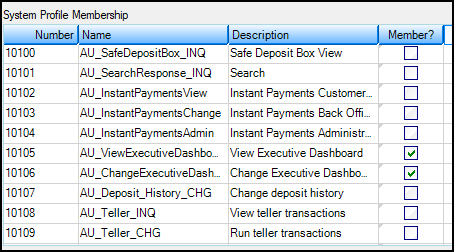
CIM GOLD Security Setup Screen, System Profile Tab
Note: These profiles will change in the future as more specific CoreView GOLD security profiles are added.