Loan Portfolio Overview Section |
  

|
Navigation: Customer Profile >
Loan Portfolio Overview Section |
|
This section displays overview information about the loan portfolio as well as ownership data, balances, and other account information. Select an account from the Loan Portfolio Overview section to view additional account summary information below.
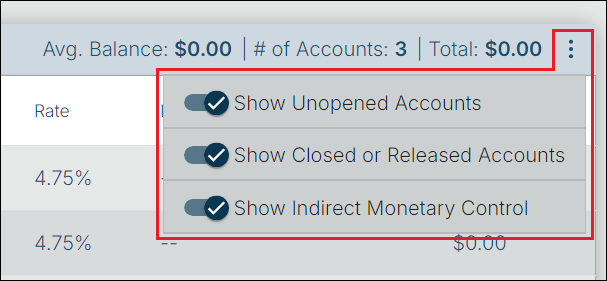
The fields in the Loan Portfolio Overview section are described below. Using the three-dot menu, you can select whether to show or hide the following:
1.Unopened Accounts
2.Closed or Released Accounts
3.Accounts with Indirect Monetary Control
Loan Portfolio Overview Section
Field |
Description |
||||||
Avg. Balance |
This is the 12-month average balance of all open loans the customer has with the bank. |
||||||
# of Accounts |
This is the number of loan accounts that are associated with the customer. This number is based on the selections you have made in the three-dot menu. |
||||||
Total |
This is the total balance for all the loan accounts that are associated with the customer. This figure is based on the selections you have made in the three-dot menu. |
||||||
Account Number |
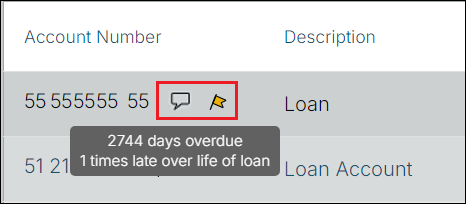
All account numbers associated with the customer are shown here.
A comment icon
|
||||||
Description |
This is the product description, loan pattern description, or customized description the account holder has given the account. Examples could be the address of the property, or a description of the loan, such as “Ford Ranger”, “Home Improvement Loan”, etc. |
||||||
Status |
This field displays the account status of the accounts tied to this account. The following are possible account statuses:
|
||||||
Maturity Date |
This is the current loan maturity date. |
||||||
Rate |
This field contains the interest rate being charged on the balance of the loan during the period of calculation as per the promissory note with the institution. |
||||||
LOC Limit / Available |
This shows the line of credit limit for the account followed by the available line of credit. It is calculated differently depending on whether it is a revolving or non-revolving line of credit.
Revolving:
LINE-OF-CREDIT LIMIT - PRINCIPAL BALANCE = REMAINING LINE
Non-Revolving:
LINE-OF-CREDIT LIMIT - LINE-OF-CREDIT USED = REMAINING LINE
Note: If the Do Not Report as a Line of Credit field is marked, then the available credit will display as a “—”. |
||||||
Balance |
This is the unpaid principal balance of the loan. It can only be entered or changed by teller transactions. Depending on the kind of loan, a transaction may either reduce or increase this balance. |
When an account is selected, the Ownership, Balances, and Account Information sections are visible. The fields in these sections are described below.
Ownership Section
Field |
Description |
Owner |
This is the account owner, which is the same as the customer name. |
Guarantor/BP/CP |
This is the guarantor/BP/CP (business partner, corporate partner) for the account, if any. |
Balances Section
Field |
Description |
Balance |
This is the unpaid principal balance of the loan. It can only be entered or changed by teller transactions. Depending on the kind of loan, a transaction may either reduce or increase this balance. |
LOC Balance |
This is the line of credit balance for the selected account. It displays the limit and the amount. This field is not visible if the loan is not a line-of-credit loan. |
Payment Due |
This is the current amount due for the selected account. |
Account Information Section
Field |
Description |
Account Number |
This is the account number for the selected account. |
Loan Type |
This is the two-digit loan type code defined by your institution. The codes and descriptions are set up in System Setup. The Loan system does not use the loan type for any reason; however, it may be displayed for loan servicing convenience. |
Account Description |
This is the product description, loan pattern description, or customized description the account holder has given the account. Examples could be the address of the property, description of the loan, such as “Ford Ranger”, “Home Improvement Loan”, etc. |
Rate |
This field contains the interest rate being charged on the balance of the loan during the period of calculation as per the promissory note with the institution. |
Due Date |
This is the date the next regular payment is due. |
Maturity Date |
This field displays the date the when the final loan payment is due as documented in the promissory note with the institution. |
Number of Delinquencies |
This field displays the number of times the account has been delinquent for longer than the grace days over the life of the loan. This field is updated by the “late charge assessment,” tran code 560. Therefore, if a loan has no grace days, this field will be blank. If a loan has grace days but no late charge rate or code, a late charge will be assessed for a zero amount and this field will be updated.
WARNING: This field works in conjunction with the 10-29 Days, 30-59 Days, 60-89 Days, and 90 or Over fields. However, if the number of grace days is less than 10 and a late charge is assessed on the account, only the Total Times Late field will be updated. The 10-29 Days field is not updated because the assessment was less than 10-29 days. |
 or a flag icon
  to the right of the account number indicates there is an account-level comment (notepad comment) or alert for the account. You can see pop-up information by hovering the cursor over the icon, as shown below.