Deposit Portfolio Overview Section |
  

|
Navigation: Customer Profile >
Deposit Portfolio Overview Section |
|
This section displays overview information about the deposit portfolio as well as ownership data, balances, and other account information. Select an account from the Deposit Portfolio Overview section to view additional account summary information below.
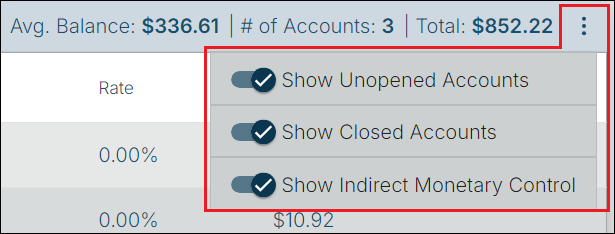
The fields in the Deposit Portfolio Overview section are described below. Using the three-dot menu, you can select whether to show or hide the following:
1.Unopened Accounts
2.Closed Accounts
3.Accounts with Indirect Monetary Control
Deposit Portfolio Overview Section
Field |
Description |
||||||||||
Avg. Balance |
This is the 12-month average balance of all deposit accounts for which this customer has direct monetary control. |
||||||||||
# of Accounts |
This is the number of deposit accounts that are associated with the customer. This number is based on the selections you have made in the three-dot menu. |
||||||||||
Total |
This is the total balance for all the deposit accounts that are associated with the customer. This figure is based on the selections you have made in the three-dot menu. |
||||||||||
Account Number |
Account numbers associated with the customer are shown here. You can select whether to show or hide unopened accounts or closed accounts using the three-dot menu.
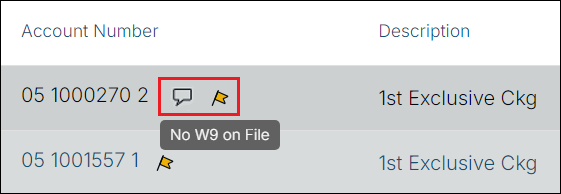
A comment icon
|
||||||||||
Description |
This is the customized description the account holder has given the account. If there is no customized description, the default description will be based on the account type, such as Checking, Savings, Certificate, etc. |
||||||||||
Status |
This field displays the account status of the accounts tied to this deposit account. The following are possible account statuses:
|
||||||||||
Maturity Date |
If the account is a Certificate of Deposit, the current maturity date will be displayed for this account. If the account is closed, a "- -" will appear in its place. |
||||||||||
Rate |
This field contains the interest rate currently being paid on this account. |
||||||||||
Term / Type |
If the account is a Certificate of Deposit, the current term and term type will be displayed for this account. |
||||||||||
Balance |
This is the current balance of the deposit account.
An institution option,BSCS—Balance That Shows on Customer Search, controls which deposit balance is displayed on the Deposit Portfolio Overview section in CoreView GOLD. The option allows each bank to decide if they want the Current Balance (default is setting), Payable Balance (P), or Available Balance (A) to be displayed in the balance column. |
When an account is selected, the Ownership, Balances, and Account Information sections are visible. The fields in these sections are described below.
Ownership Section
Information in this section displays all the names and their ownership/relationship to the account.
Balances Section
Field |
Description |
Available Balance |
This is the Payable Balance plus the negative limit, plus any available overdraft credit in the five possible overdraft accounts, minus secured loan amounts in the five possible loan account fields. It is calculated as follows:
Payable Balance + Negative Limit + Overdraft Credit Amounts – Secured Loan Amounts _________________________________
Available Balance |
Current Balance |
This is the current balance of the account. The current balance can be a positive or a negative amount. |
Payable Balance |
This field displays the customer's current payable balance on the account. It is calculated as follows:
Current Balance - Minimum Balance - Uncollected Funds - All Monetary Holds - OTC holds (if the checking feature is used) = Payable Balance |
Account Information Section
Field |
Description |
Account Number |
This is the account number for the selected account. |
Product Code/Description |
This is the description your bank has assigned for the product code number used on this account. |
Account Features |
This shows the two-character code for the account type, e.g., "CK" for checking. |
Rate |
This displays the interest rate currently being paid on the selected account. |
Opened Date |
This is the date the customer opened the selected account with the bank. |
Maturity Date |
If the account is a Certificate of Deposit, the current maturity date will be displayed for this account. If the account is closed, the closed date will appear in its place. |
Date of Last Maturity |
If the account is a Certificate of Deposit, the last maturity date prior to the current maturity date will be displayed for this account. |
Term / Type |
If the account is a Certificate of Deposit, the current term and term type will be displayed for this account. |
Cards Associated |
This shows the number of cards associated with the selected account. |
 or a flag icon
  to the right of the account number indicates there is an account-level comment (notepad comment) or an alert for the account. You can see pop-up information by hovering the cursor over the icon, as shown below.