Changing Client Numbers |
  
|
Navigation: App. F - G/L Transaction Entry in CIM GOLD >
Changing Client Numbers |
|
If you have more than one client number set up in General Ledger, you can select which client number you will be posting General Ledger transactions to.
Note: You must establish the correct client number before accessing the Transaction Entry screen.
To access a client number:
| 1. | From the File menu in CIM GOLD, select Change Client Number > General Ledger (or press <Ctrl> + <Shift> + G on your keyboard). |
The Change Client Number dialog box is displayed, as shown below:
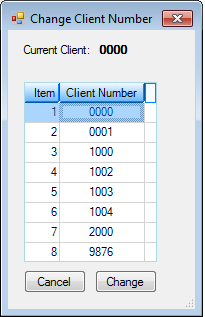
| 2. | Select the client number you want to use from the list view, and then click <Change> (or just double-click the client number). |
The list view will close and the client number you selected will now be used in CIM GOLD. The list will only show client number that exist on FPS GOLD's host computer.
For more information about client numbers, see section 3.1, Client Numbers, in the General Ledger manual in DocsOnWeb.