App. F - G/L Transaction Entry in CIM GOLD |
  

|
Navigation: »No topics above this level«
App. F - G/L Transaction Entry in CIM GOLD |
|
Download printer-friendly version
The General Ledger Transaction Entry screen allows you to enter transactions or journal entries to be posted to the General Ledger. The Transaction Entry screen can be customized to include only the fields needed when inputting journal entries. Files can also be uploaded to General Ledger through this function.
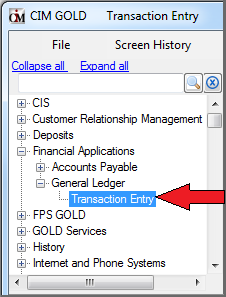
The Transaction Entry screen operates within CIM GOLD under the Financial Applications menu in the left tree navigation, as shown below.
Features
If you are familiar with the FPS GOLD Accounting system, you may already know that you can post transactions in the General Ledger system in GOLDVision and in G/L GOLD. The ability to post G/L transactions in CIM GOLD helps your institution successfully track debits and credits in your General Ledger accounts.
The benefits of posting transactions in CIM GOLD include:
•Fast processing
•Pre-validation performed on local machine prior to sending to host computer for processing
•Quick access to Chart of Accounts
•Import files in several formats, including directly from Excel
•Robust transaction filtering capabilities
•Configurations stored in a common-access database
Security must be set up for all employees at your institution who will be using this screen. For more information on security, see Setting Up Security.
Content
See the following links for more information concerning the General Ledger Transaction Entry screen.