Configurations |
  

|
Navigation: App. F - G/L Transaction Entry in CIM GOLD >
Configurations |
|
Before you can start entering and posting G/L transactions, you need to set up the Transaction Entry screen with specific fields you want included with the transactions. Clicking the <Configurations> button on the Transaction Entry screen allows you to set up specific fields for different configurations you set up.
You can set up as many configurations as you need. Once a configuration is set up, you can use the it each time you access the Transaction Entry screen by selecting it from the drop-down list, as shown below:
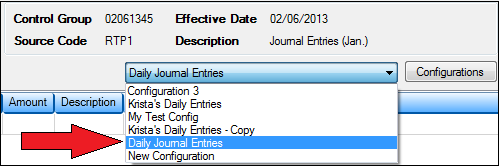
Once you select the configuration from the drop-down list, the fields on the Transaction Entry screen will change accordingly.
For more information on setting up configurations, see Customizing the Transaction Entry Screen.