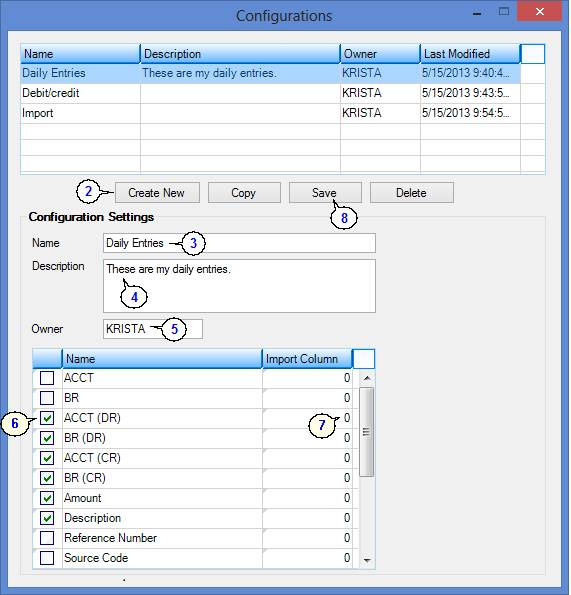
| These are the fields where users enter transaction information. |
Field
|
Description
|
ACCT, BR, SUB
|
Select all available account subfields. See your account number structure for more information.
|
ACCT, BR, SUB (DR) (CR)
(Debit/Credit Accounts)
|
If the first account fields (ACCT, BR, SUB) are used, the credit and debit account fields cannot be used, and vice versa.
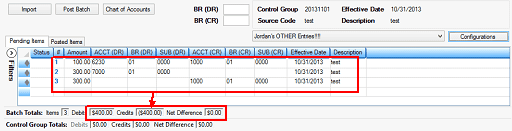
If the configuration you are using is set up with the debit and credit accounts, you will only need to enter one amount, and the system will duplicate the amounts into the separate debit and credit accounts, as shown in the following example:
|
Field
|
Description
|
Amount
|
This is the amount of the transaction. This amount can be either positive or negative, depending on which type of account you have selected (see definitions above).
For example:
•If you have selected the Debit Accounts, the amount entered in this field would automatically be positive. •If you selected the Credit Accounts, the amount entered would automatically be negative. •If you entered the Debit/Credit Accounts, you must manually enter the negative sign to the amount to indicate that it is a credit.
This field is mandatory, so this box should always be checked on all configuration setups.
|
Description
|
Check this box if you want to include a description with the transaction you are entering or importing.
|
Reference Number
|
Check this box to include the Reference Number field on the Transaction Entry screen. The reference number is a user-defined field.
|
Source Code
|
Check this box to include the Source Code field on the Transaction Entry screen. The source code is user-defined. Source codes are used as search parameters for retrieving transactions for correction, review, deletion, etc. You can also enter a code to refer back to the description entered in the Description field. For example, if you entered "Monthly Checks" in the Description field, you could enter "C" as the source code for checks.
|
Effective Date
|
Check this box to include the Effective Date field on the Transaction Entry screen. The Effective Date entered must match the accounting period you are posting transactions to, or you will receive an error message.
|
Payee
|
Check this box to include the Payee field on the Transaction Entry screen. This field allows you to enter a payee associated with transactions.
|
Quantity
|
Check this box to include the Quantity field on the Transaction Entry screen. The Quantity and Standard Unit Quantity fields are used for entering statistical data.
|
Standard Unit Quantity
|
Check this box to include the Standard Unit Quantity field on the Transaction Entry screen.
The Quantity and Standard Unit Quantity fields are used for entering statistical data.
|
Distribution Profile
|
If you check this box, the Distribution Profile field displays on the Transaction Entry screen. This field is a drop-down field, and displays all distribution profiles previously set up previously on the Distribution Profile screen (function 87/88). Distribution profiles allow you to enter one transaction on this screen and have the system distribute that transaction between several accounts as set up in the distribution profile.
For example, if your institution hires a custodial service to clean five of your branches, you can distribute the monthly cost of the custodial service. Rather than manually splitting the cost and entering five transactions for each branch's portion of the cost, set up a distribution profile.
|
Branch Allocation Table
|
Check this box to include the Branch Allocation Table field on the Transaction Entry screen. The field appears as a drop-down list, on the Transaction Entry screen, and only Branch Allocation Tables that you have set up on the General Ledger Branch Allocation screen (function 92) will be displayed in the drop-down list.
|
Account Title - Long
|
Check this box if you want to include an Account Title - Long field on the Transaction Entry screen. This field is for display purposes only; file maintenance is not allowed.
|
Account Title - Short
|
Check this box if you want to include an Account Title - Short field on the Transaction Entry screen. This field is for display purposes only; file maintenance is not allowed.
|
|