|
User Profiles |
  

|
Navigation: »No topics above this level«
User Profiles
|
User Profiles |
|
Use the User Profile screen to view user limits and to enroll the user in two-factor authentication.
Viewing User Limits
You can view your User limits and which department permission groups you belong to.
To view your user limits and groups:
1.Select “Profile” from the EFT GOLD Menu.
The Permissions page opens.
Total Daily Limit
Total Daily Limit displays the user's total daily limit for wire approval. If your institution has the Daily Limit Method Option set to "Max Value" (see Admin > Options > Limits section), this will display the highest Daily Max Limit found for this user. If your institution has the Daily Limit Method Option set to "Sum," this will display the sum of all the Daily Max Limits found for this user.

Department Permissions
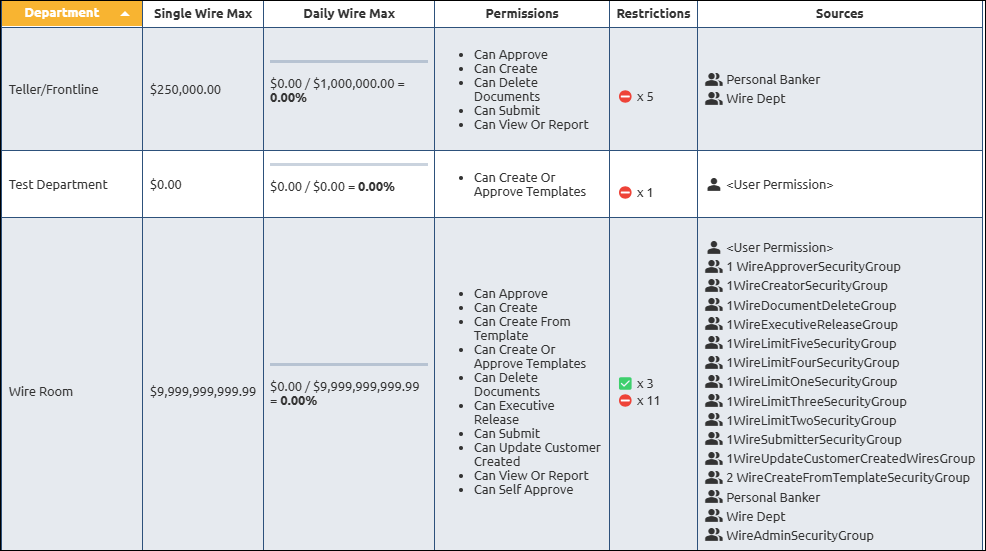
The Department is the wire department these limits and permissions apply to.
The Single Wire Max limit is the maximum dollar amount that cannot be exceeded for a single wire approved by this user for this department. The maximum amount is $9,999,999,999,999.99. If you are a member of multiple permission groups for the same department, the highest single wire limit will be used.
The Daily Wire Max limit is the maximum dollar amount that cannot be exceeded when combining the approved wire dollar amounts for this user for this department. The maximum amount is $9,999,999,999,999.99. If you are a member of multiple permission groups for the same department, the highest limit will be used.
The Permissions column displays the permissions this user has for this department.
The Restrictions column displays any restrictions and/or allowances the user has for this department.
The Sources column displays the Security groups or User permission that you belong to that provide the permissions.
NOTE
Changes to permissions and limits are made in Admin > Users/Groups. |
EFT GOLD Administrative Groups
This displays the EFT GOLD administrative groups this user belongs to.
