Navigation: »No topics above this level«
Introduction
GOLDDeploy makes it easy to install FPS GOLD software updates as soon as they become available. Your institution can specify certain instructions for the installations, such as the schedule and whether you want to start the installation manually or automatically. After setup is complete, GOLDDeploy can install software updates according to your specifications.
Some FPS GOLD products require special procedures in order to install them with GOLDDeploy. For details, see the section on the Products that Require Special Setup at the end of this guide.
This section gives an overview of how GOLDDeploy works. See the sections on the GOLDDeploy Agent and on the GOLDDeploy Management Screen for details on setup.
GOLDDeploy includes the following features to ensure installation accuracy and security:
•All actions are logged at all levels. The GOLDDeploy log lists the functions and updates that were attempted and performed. The log is also reported to FPS GOLD so that we can provide help, if necessary, with installation problems.
•Security is enforced. No machine can receive installation packages without first being properly registered with the deploy server.
•Your institution controls who can see the system and who can approve and release packages in the system.
Once software is deployed to your computers, software updates from the FPS GOLD website should not be installed. GOLDDeploy will automatically override the version on your computers.
How GOLDDeploy Works
The steps and flow chart below give a general overview of how the system works.
1.A target machine at your institution has a GOLDDeploy agent installed on it.
2.With help from FPS GOLD, you set up GOLDDeploy options for your institution.
3.The agent talks to the FPS GOLDDeploy server to see if any updates need to be installed.
4.The server sends the agent a list of what needs to be installed.
5.The agent uses a pre-determined schedule to get the installation package from the production package repository.
6.The agent gets installation parameters from the server.
7.The agent installs the software.
8.The agent reports results to the deploy server.
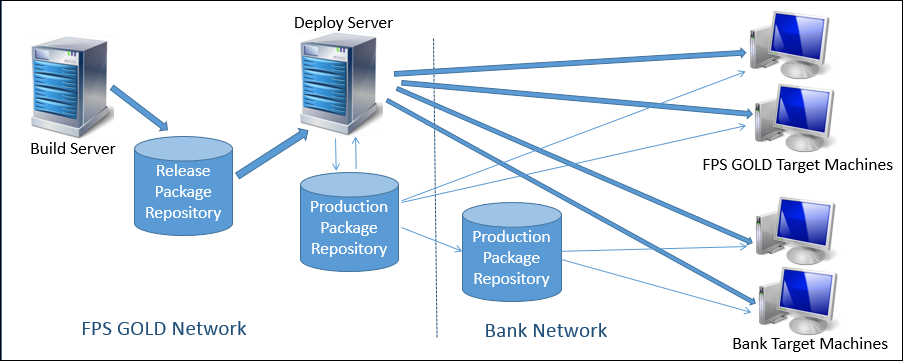
Definitions
The following definitions describe the terms used in this document and on the GOLDDeploy screens.
•Deploy Server – A single deploy server controls all installation services for FPS GOLD clients. Target machines register with the deploy server in order to receive packages.
•Parent Server – Another name for the Deploy Server.
•Product – This is a basic unit installed on a machine. For example, one product might be GOLDTeller Stand Alone, and another might be GOLDTeller with Platform.
•Release Package – When a new version of a product is ready for release, the files that make up the product and its installation instructions are bundled into a release package. When a target machine receives a release package, it uses the instructions in the package to install the new version of the product on the target machine.
•Schedule – A schedule links a release package to a target machine and gives the delivery date and time. Schedules also contain information about the status of the package installation.
•Repository Server – The deploy server links to a repository server that houses the actual installation packages. That repository server may link to one or more other repository servers. Each repository server gets a copy of the release packages. During software installation, the deploy server directs the target machine to the repository server it should access to get the installation packages.
•Subscription – A subscription links a product to tags.
•Tag – A tag is a word that describes the role of a target machine, such as Production, Test, Office3, and Teller.
•Target or target machine – A target is a computer that receives a release package and installs it on the machine. A target’s role is described by tags.
•User – The user is a person given security to log on to a GOLDDeploy server. Users can be given view-only privileges, deployment privileges, or administrative privileges.


