GOLDTeller |
  

|
Navigation: GOLDDeploy Management Screen > Products that Require Special Setup >
GOLDTeller |
|
This section explains how to use Tags and Installation Parameters to install GOLDTellerCIM.
GOLDTellerCIM and Platform both point to a DB4 Server to have access to their data files. For GOLDDeploy to install these products, it must have this information.
To set up GOLDTellerCIM for GOLDDeploy installation, first set up a Tag, and then set up Installation Parameters. These procedures are explained below.
To set up tags GOLDTellerCIM installation by GOLDDeploy:
1.Open the GOLDDeploy Management screen in CIM GOLD.
2.Click on the Tags tab.
3.Add a tag name to Institution Tags.
4.Open the Target Machines tab.
5.Add the new tag to all target machines.
Say you have an office identified as "Main." In the GOLDDeployment Management screens, you could add a tag of "Main" and then add that tag to all Target machines in the Main office.
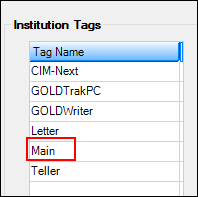
Create a tag called "Main."
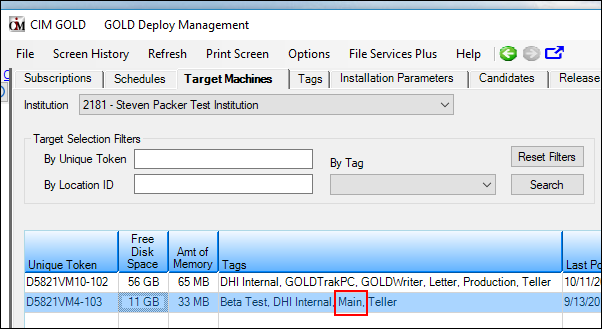
Add "Main" to the Target machines.
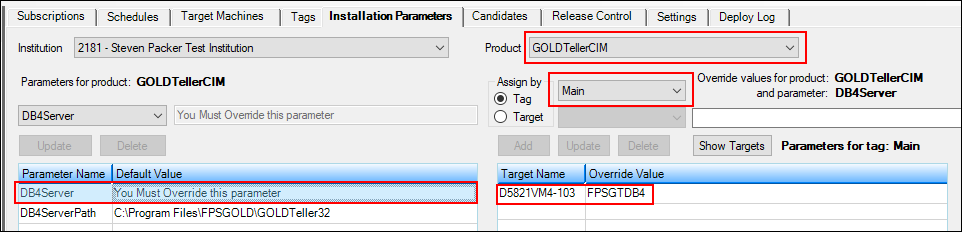
After you have added the tag to the appropriate target machines, you would then go to the Installation Parameters tab and add the parameters for the GOLDTellerCIM product.
To add the parameters for GOLDTellerCIM:
1.On the Installation Parameters tab, select "GOLDTellerCIM" from the Product drop-down list.
2.Click on "DB4Server" in the Parameter Name column at the left of the screen.
3.On the right side of the screen, click on the Tag radio button, then select the "Main" tag from the Tag drop-down list.
4.Click on the Target radio button, then enter the DB4Server name for the Main office and click <Add>. This will add the DB4Server parameter for all targets with a tag of "Main." The target name displays in the list below the <Add> button.
5.Click on "DB4ServerPath" in the Parameter Name column at the left of the screen, then repeat steps 3 and 4 above for the path. The DB4ServerPath is the path on the DB4 Server where the data files for GOLDTellerCIM are located.