Navigation: »No topics above this level«
GOLDDeploy Management Screen
|
  

|
Use the GOLDDeploy Management screen (found under Other Applications in CIM GOLD) to set up the details of how your institution wants GOLDDeploy to work. See the example below.
Before you can use this screen, three predefined System Profile security groups must be created and tied to the appropriate employees. For details, see Setting Up Security in the GOLDDeploy User's Guide. Subscribe to Mini-Applications for GOLDDeploy Management must also be set up, and you must have a GOLDDeploy Agent installed and configured.
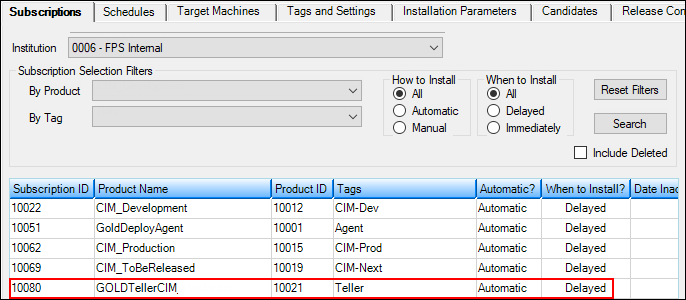
Other Applications > GOLD Deploy Management Screen
The tabs on the screen handle the specific parts of the deployment process:
•Subscriptions tell the system which products should be installed on which target machines.
•Schedules determine when to install a specific product version on the target machines.
•Target Machines show the end-user machines that have registered with the server and can receive installation packages.
•Tags and Settings are used to define Common and Institution tags.
•Installation Parameters are created to allow for variations in different types of installations. Parameters can be defined at the product level and at the target machine level. You can also override the parameters at both levels.
•Candidates are programs that can be distributed with GOLDDeploy. FPS GOLD employees determine which candidates are released.
•Release Control is an FPS GOLD ONLY tab and is managed by our release manager.
•Settings are used to define various basic settings and options that control the release process.
•Deploy Log shows a history of all system changes and product installations in the system.
See the section for each tab for information on how to use it.
