Settings tab |
  

|
Navigation: GOLDDeploy Management Screen >
Settings tab |
|
The Settings tab is used to enter settings and options used by the system.
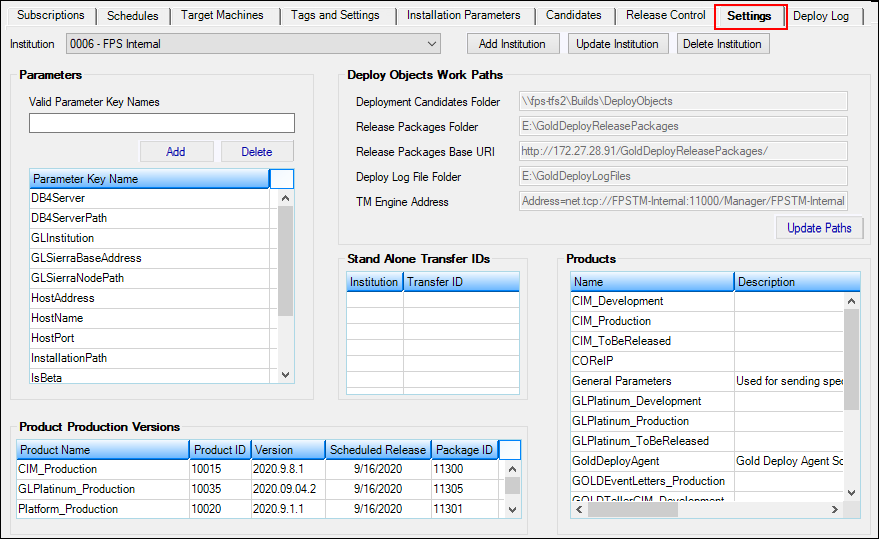
Use the buttons at the top right of the tab to add, change, or delete institutions.
WARNING
Deleting an institution removes all items on the Deploy server for that institution. Deletion cannot be undone. |
To add an institution to the deploy server:
1.Click <Add Institution>.
The following dialog box opens.
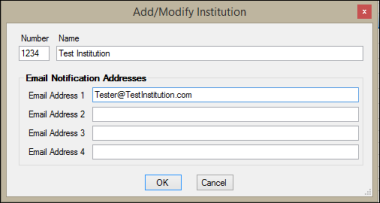
2.Enter the institution number in the Number field.
3.Enter the institution name in the Name field.
4.Enter one or more email addresses. These addresses are used to notify the bank whenever a new package has been released.
5.Click <OK>.
To change the details for an existing institution:
1.Open the Institution drop-down list and select the institution you want to change.
2.Click <Update Institution>.
3.Change one or more details in the Add/Modify Institution dialog box. You can't change the institution number.
4.Click <OK>.
To delete an institution:
5.Open the Institution drop-down list and select the institution you want to delete.
1.Click <Delete Institution>. A confirmation dialog box opens.
2.Click <OK>.
Deploy Objects Work Paths field group
Stand Alone Transfer IDs field group