Products field group |
  

|
Navigation: GOLDDeploy Management Screen > Settings tab >
Products field group |
|
The products are defined by the system when a new build package is released to production. The Products list on the Settings tab is used to update attributes about the product. There is no add feature.
To remove a product from the system:
1.Right-click on the product.
2.Select "Delete Selected Products" from the pop-up menu.
3.Click <Yes> on the Verify Delete dialog box.
To change details for a product:
1.Right-click on the product.
2.Select "Update Selected Product" from the pop-up menu.
The Update Product dialog box opens.
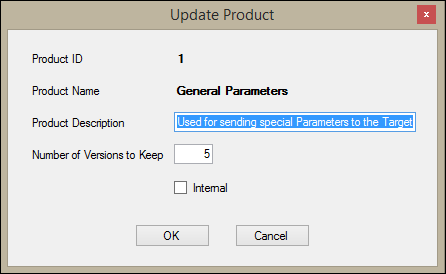
3.Enter new information in the editable fields:
•Product ID and Product Name cannot be changed.
•Product Description – Enter an optional description of the product here.
•Number of Versions to Keep – This tells the system how many back versions of the product to keep on file before automatically removing them.
•Internal – If this field is checked, this product is only released to FPS GOLD employees.
4.When you have finished making changes, click <OK>.