Installation Parameters tab |
  

|
Navigation: GOLDDeploy Management Screen >
Installation Parameters tab |
|
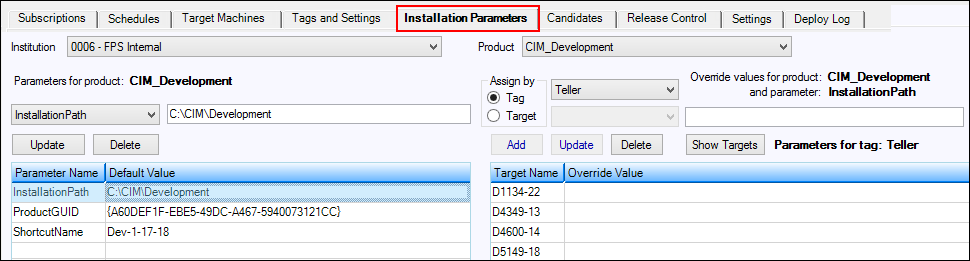
Use the Installation Parameters tab to set the values of the parameters for product installations. Default values are defined for each product. Override values may be assigned to each target machine. The installation uses the override value if one exists and the default value if there is no override value.
WARNING
As soon as you click <Delete> for a parameter, it is deleted. There is no confirmation dialog box. Deletion cannot be undone. However, you can add the parameter again if needed. |
To add a parameter to a product:
1.Select the product from the Product drop-down list.
2.Select the parameter you want to work on from the drop-down list.
3.Enter the default value for the parameter in the box next to the drop-down list.
4.Click <Add>.
To delete a parameter from a product:
1.Select the parameter you want to delete.
or
Right-click on the tag to open a pop-up menu.
2.Click <Delete>.
To change the default value for a parameter:
1.Open the drop-down list and select the parameter you want to rename.
2.Enter a new default value for the parameter in the box next to the drop-down list.
3.Click <Update>.