Requesting Loan Event Letters |
  

|
Navigation: Loan Event Processing >
Requesting Loan Event Letters |
|
The Event # and Letter Number fields on the Letters & Actions tab work together to request an event letter other than the default letters generated by the system. When the system detects a pre-defined event happening, it checks to see if the number in the Event # field is the event number that is happening. If so, the system will generate the letter number in the Letter Number field instead of using the default letter as the letter number.
When you enter a date in a Letter Date field, the system will generate an event record using the event number in the Event # field on that date, as if the event were happening. Using this event record, the system will generate the letter number entered in the Letter Number field.
When you use the Letter Date field to request an event letter on a specific date, the system will only generate the event record and the event letter. It does not cause the actual event to occur. GOLD EventLetters does not allow two of the same event (even with differing letter numbers) to be ordered on the same night. Only the first event will be created.
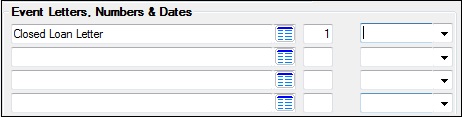
The following is an example of the Event Letters, Numbers & Dates field group on the Letters & Actions tab where event letters are manually requested.
Note: If you want an event to generate that is not currently defined, please submit a work order to your FPS GOLD loan banking consultant to have the event programmed.