Event Description |
  

|
Navigation: Loan Event Processing >
Event Description |
|
An event occurs when a pre-defined event affects a loan or when you manually request an event letter. Some examples are when a loan rolls a rate, when it is delinquent, or when a loan account is opened or closed.
Each pre-defined event has an assigned event number. When an event occurs, the system automatically generates an event data file. The next day your institution will then download the events data file and merge this data file into letter templates stored on your PC. When an event letter is generated, it is written in history.
WARNING
Customers are wholly responsible for the format and wording of event letters. FPS GOLD does not guarantee that sample letters comply with regulatory agencies. See Setup Procedures for detailed instructions on how to create the letter in Microsoft Word and use the Mail Merge function to merge GOLD EventLetters-generated data with the letter. |
The Letters & Actions tab in CIM GOLD is used to manually request a letter or change the letter being created from the default (0) to a specific letter number. GOLD EventLetters does not allow two of the same event (even with differing letter numbers) to be ordered on the same night. Only the first event will be created.
NOTE
Unless you have manually requested the letter on the Letters & Actions tab, the letter number assigned by the system will always be 0 (default). |
For example, if the system automatically generated a “closed loan letter,” GOLD EventLetters would automatically assign it event 22, letter 0. However, if you want a different letter than the default letter, you would complete the following steps:
| 1. | On the Letters & Actions tab, you would select event 22 (Closed Loan Letter) and type the specific letter number (1 through 255), and no date (as shown below) in the Event Letters, Number & Dates field group. |
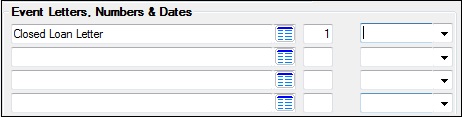
| 2. | When the loan is paid off, GOLD EventLetters would generate the specific letter you specified in the Letter Number field. |
FQUICK TIP
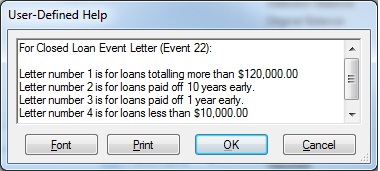
If your institution has multiple versions of letters for certain events, you may want to save that information to the user-defined help. For example, your institution may have many different versions of the closed loan letter (Event 22), and you may want to create a different letter than the default letter (0). However, you can't remember which letter number should be used in which circumstance. You could save that information using user-defined help.
Complete the following steps to add user-defined help.
User-defined help is informational only. |
If you want a letter to be created on a specific date, such as tonight, you would enter the event number, the letter number if other than letter 0 (default), and the date you want the letter created. During the night of the letter date, the system will create the letter.
Loans with a general category of 80 and above or loans with an origination code of 3, 15, or 16 (loans purchased/serviced by others) will not create letters.
Information entered on the Letters & Actions tab from anywhere in the Loans system is saved, and the information appears on the tab wherever it exists in CIM GOLD. The Letters & Actions tab can be found on the following screens:
•Loans > Account Information > Account Detail screen
•Loans > Account Information > ARM Information screen
•Loans > Account Information > Line-of-Credit > Commercial Line-of-Credit screen
•Loans > Account Information > Line-of-Credit > Consumer Line-of-Credit screen
•Loans > Account Information > Payoff screen
•Loans > Account Information > Precomputed Loans screen
•Loans > Account Information > Tracking > Account Tracking Items screen
•Loans > Collections > Account Delinquency screen
•Loans > Collections > Bankruptcy screen
•Loans > Collections > Foreclosure & Repossession & Judgment
Also see Appendix A for a listing of fields pulled from the Loans system available for each event letter. The following is an example of this tab.
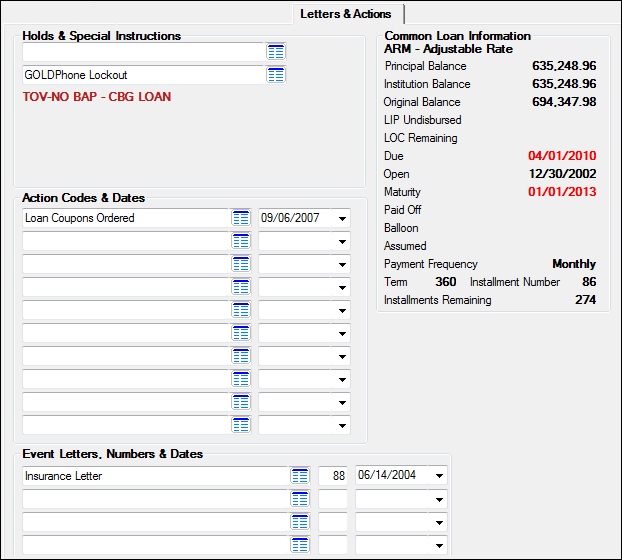
Letters & Actions Tab
The following chart lists the event numbers currently defined when an ARM loan (payment method 7 or payment method 6 ARM) rolls a rate.
Event Number |
Subsidy Payment Change |
Next Accrual Rate Change |
Next P/I Payment Change |
Periodic Rate Cap Used |
Lifetime Rate Cap Used |
|---|---|---|---|---|---|
no |
up |
no |
yes |
no |
|
no |
down |
no |
yes |
no |
|
no |
up |
yes |
yes |
no |
|
no |
down |
yes |
yes |
no |
|
no |
down |
no |
no |
no |
|
no |
down |
yes |
no |
no |
|
no |
up |
no |
no |
no |
|
no |
up |
yes |
no |
no |
|
no |
up |
yes |
yes |
yes |
|
no |
down |
yes |
yes |
yes |
|
no |
up |
yes |
no |
yes |
|
no |
down |
yes |
no |
yes |
|
no |
down |
yes |
no |
no |
|
no |
up/down |
no |
yes |
yes (min/max) |
|
no |
up/down |
no |
no |
yes (min/max) |
|
no |
up/down |
yes |
yes/no |
yes/no |
|
no |
up/down |
yes/no |
yes/no |
yes/no |
Refer to event 40 described below.
Other events that do not pertain to ARM loan rate rolls are listed here with their event numbers.
Event |
Event Number |
Description |
|---|---|---|
5 |
This event automatically produces an event letter when the loan rate changes on a payment method 5 or a payment method 6 (non-ARM loan). |
|
13 |
This event record is generated when the system encounters tran codes 440 (escrow disbursement), 448 (escrow disbursement correction), 640 (reserve disbursement), and 648 (reserve disbursement correction) for a single, family-owned (collateral code 1-4), owner-occupied loan (LNOWNR is checked) for escrow/reserve disbursement codes. |
|
14 |
This event record is not generated automatically. It must be requested. This letter can also be requested by using the Letter Date and Letter Number fields on the Loans > Account Information > Payoff screen. Only event letter number 14 can be requested from that screen. |
|
15 |
This event record is automatically generated when the Prior Unpaid Charges field on the Loans > Construction > Account Construction Detail screen is changed. |
|
16 |
This event record is not generated automatically. It must be requested. |
|
21 |
This event record is generated when the system encounters tran code 680 (new loan). The origination officer's name and number are available for this letter. |
|
22 |
This event record is generated when the system encounters tran code 580 (close loan). |
|
23 |
This event record is not generated automatically. It must be requested. The loan must be delinquent when this event is ordered or the letters will not generate. (The due date must be in the past.) Date and time of appointment can be set up in Action Code 210 and 211 on the Letters & Actions tab. |
|
24 |
This is reserved for letters that are a special request of the institution. This is the same as event 23, except the loan does not have to be delinquent. |
|
25 |
This letter can be generated any number of days before the maturity date. You must inform FPS GOLD of the number of days prior to maturity the letters should be generated. The system defaults to 120 days.
FPS GOLD Only: Set OPT7-MDYS to the desired number of days. |
|
26 |
This letter will be generated on the maturity date. |
|
27 |
This letter will print when there is and action code 1 (Balloon Payment Due) on the loan. Action code 1 stops all activity on the loan. This letter can be generated from 1 to 99 days before the balloon date. You must inform FPS GOLD of the number of days (01–99) prior to the balloon date the letters should be generated.
FPS GOLD Only: The first two positions of the Miscellaneous Parameters field should contain the number of days (01-30) prior to the balloon date that event 27 should be generated. If left blank, then the letter will generate on the balloon date. The parameters are set up on the FPS GOLD > Report Setups > Loan Reports screen for the GOLD EventLetters Report (FPSRP175). |
|
28 |
This letter is generated upon request from this screen; however, if no payoff record exists it will not be created. If you attempt to set up this letter, the system will first check to see if a payoff record exists. If it doesn't, you will receive the message "MUST CREATE PAYOFF RECORD FIRST." If it does, the letter will be created. You must lock in payoff, then unlock it (that creates the payoff record), then order event letter 28 on the Letters & Actions tab. Use the same date you used in the Letter Date field on the Loans > Account Information > Payoff screen. |
|
29 |
This letter is generated when a loan is sold to allow you to inform all associated with the loan that it was sold. All information found on the Loans > Payee > Payee Information screen can be used to build this event letter. This event can be created with information regarding the company that disbursements are sent to. This event creates multiple letters; e.g., if you have three insurance companies set up, you will receive three separate letters. Institution option T EV29 will stop letters from being created for disbursement types 10 through 19 (taxes). If you would like this option, submit a work order. This event must be requested through a work order and set up manually. |
|
30 |
This letter is generated one month prior to the new subsidy effective date pulled from the Loans > Account Information > Escrow/Reserve > Escrow & Reserve Detail screen. Tracking subsidies is not currently available in CIM GOLD. Contact your FPS GOLD customer service representative for more information. |
|
31 |
This letter is generated one month prior to the subsidy expiration date. |
|
32 |
This event will generate a letter to inform the customer that a disbursement item is about to expire. The letter will generate a specific number of days before the expiration date. Refer to events 39, 51, and 52. |
|
33 |
This letter is generated when the credit limit for line-of-credit loans has been exceeded. This is for line-of-credit loans (payment method 5) only. Commercial line-of-credit loans (payment methods 9 and 10) will not generate this event. The letter will automatically be created when the date of the last transaction is today and the principal balance exceeds the credit limit.
Note: A letter will be created each time the date of the last transaction changes; this may result in more than one letter being created within several days. (The date of the last transaction is for monetary activity only.) The letter can also be ordered manually. |
|
34 |
All P/I change fields are checked for a change, and any change is reported on the letter. No rate changes are included in this letter. |
|
35 |
This letter is sent once a year as required by the National Affordable Housing Act, section 329 and follows the format defined by HUD. In the afterhours on the date requested by the institution, the system automatically selects letter 35 or 36 using the Date Opened field on the Loans > Account Information > Account Detail screen, Origination tab. The letter prints the payoff amount, the fees pertaining to the payoff either as part of the total payoff amount or as a separate amount, and any requirements the borrower must fulfill to prevent accrual of interest on the mortgage loan after the pre-payment date.
To request this letter, submit a work order to FPS GOLD indicating the telephone number of your Loan Service Department for the borrower to call, the name and title of the employee who signs the letter, and how the payoff fees are disclosed. To manually generate this letter, set up the event on the Letters & Actions tab. The payoff is calculated to the end of the month following the date that the event letter is requested. |
|
FHA Loan Payoff Letter (Mortgages Closed on or After January 21, 2015) |
36 |
This letter is generated and calculated the same as event 35 with the following exceptions:
1. This letter is for FHA loans closed on or after January 21, 2015.
2. One of the following sentences can be printed on the letter specified by your institution:
Option 1: Otherwise, your prepayment will be refused until the next installment due date and interest will be charged to that date.
Option 2: Otherwise, you may be required to pay interest on the amount prepaid through the end of the month. |
|
|
Event |
Event Number |
Description |
|
|---|---|---|---|
39 |
Event 39 is the same as event 32 with the exception that the letter generates the day the disbursement item expires.
This letter is automatically generated, and the following options must be set up:
Institution options RDEX and RDE2 store the disbursement types for which the bank would like letters to be automatically generated.
This event must be requested through a work order. Refer to events 32, 51, and 52. |
||
P/I Payment Change Different than Rate Changes Letter (CNE040) |
40 |
All P/I change fields are checked for a change, and any change is reported on the letter. The letter includes a summary of interest rate changes that have occurred since the last P/I change. This letter can only be generated if the Use Event Letter 40 field on the Loans > Account Information > ARM Information screen, Rate Caps & Negative Amortization tab displays a checkmark, the rate change frequency is not the same as the P/I payment change frequency, and you have requested the event letter by work order.
For example, if the next P/I change is on April 1, the last P/I change was April 1, and the interest rate does not change on April 1, the event letter will generate showing the next P/I change date and amount and all the rate changes since April 1. |
|
41 |
Event 41 calculates the new P/I while the loan is still in the construction process. If the LIP method code is 1 or 101 and the loan fields on the Loans > Account Information > ARM Information screen call for a P/I change, the system will calculate the new loan accrual rate and P/I payment.
|
||
42 |
Event 42 will generate an LIP rate change letter if the LIP (construction) rate changes are either based on a rate change date or for rate sensitive loans. This letter will only create if the LIP method code is 1 or 101. |
||
43 |
Event 43 will generate a billing letter for charging interest on negative escrow/reserves. |
||
44 |
Event 44 generates a letter for the first late notice. In order to generate late notices through the event letter system, the event number (44, 45, or 46) must be entered in the Notice 1 Type, Notice 2 Type, and Notice 3 Type fields on Loans > Account Information > Fees & Late Charges & Penalties screen, as well as the desired number of days. |
||
45 |
Event 45 generates a letter for the second late notice. Also see the Past Due Notices help. |
||
46 |
Event 46 generates a letter for the third late notice. Also see the Past Due Notices help. |
||
47 |
Event 47 will generate a letter anytime an insurance policy expires or a Force Place Insurance transaction (tran code 2870) is run. |
||
48 |
This event generates if a Miscellaneous Fee transaction or corresponding correction is processed on an account.
Valid transaction codes are: |
||
49 |
This letter must be requested manually. |
||
50 |
This letter must be requested manually. |
||
51 |
This event will automatically generate letters for disbursement types 20-28 and 40-49 that will expire within 75 days. A separate letter is created for each disbursement item. Note: This event can also be manually requested within 75 days prior to the expiration date or any time after the expiration date.
Refer to events 32, 39, and 52. |
||
52 |
This event will automatically generate letters after the expiration date for disbursement types 20-28 and 40-49. A separate letter is created for each disbursement item. Note: This event can also be manually requested within 75 days prior to the expiration date or any time after the expiration date. Refer to events 32, 39, and 51. |
||
53 |
ARM event letter 53 will automatically generate for loans that have the Use this Base Index Rate option (LNBSIN) checked and that have an event that would trigger any of the following ARM event letters: 1, 2, 3, 4, 6, 7, 10, 11, 17, 18, 19, 20, 37, and 38. Instead of the normal event letter generating, it is switched to event 53. The triggering events need to be set up to be used in the institution’s options. Only letter 0 is available for use. |
||
2040 |
It is important to note that the change of address event letter for loan accounts is generated in the Deposit Events system. All 2040 address change event letters, regardless of whether they are for deposits or loans, will be generated in the Deposit Events system. If a loan event letter is ordered, it will show on the history for the loan.
This event will generate a letter any time any part of the address mailing lines change for an open or closed deposit or loan account. If multiple accounts are tied to the same address, an event record will generate for the IRS owner tied to each account with that mailing address. One letter per IRS owner will be created. Letters should be sent to the "old" address (remember this when creating your mail merge document in Microsoft Word). The merge fields are as follows:
OLD_MAILING_LINE_1
The "new" address should be indicated in the body of the letter using the new mailing line merge fields. The merge fields are as follows:
NEW_MAILING_LINE_1
Only one account number for each IRS owner per address change will be available for the event, and all mailing address changes tied to deposit and loan accounts will be included.
For CIS clients, a letter will be created for the regular account address or the alternate address, whichever one is in effect at the time of the change.
In order for this event to generate for a loan account, you must checkmark the Address Change checkbox field on the Deposits > Definitions > Event Setup screen.
If you are already using the address change event letter, but want to add loan accounts, please send in a work order and the minimum one-time fee will be assessed. If you want to begin using the address event letter for the first time, send in a work order and a $450.00 one-time fee will be assessed for the use of this event. Be sure to indicate if you want loan accounts included.
|
See also: