Deposits - Descriptors and Fees Tab |
  

|
Navigation: Institution Options Screen > GOLD ExceptionManager Tab >
Deposits - Descriptors and Fees Tab |
|
The Deposits - Descriptors and Fees tab on the GOLDException Manager tab lists most of the deposit fee and descriptor options available to customize within your institution. Some institution options are maintained by FPS GOLD.
See the following example of this tab, followed by field descriptions.
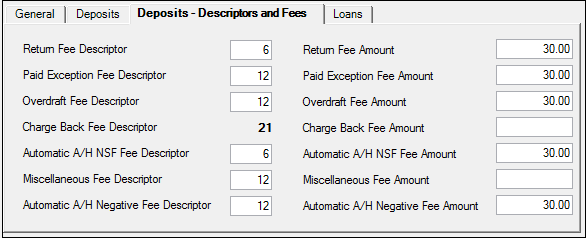
GOLD Services > Institution Options Screen, GOLD ExceptionManager Tab,
Deposits - Descriptors and Fees Tab
•Paid Exception Fee Descriptor
•Automatic A/H NSF Fee Descriptor
•Automatic A/H Negative Fee Descriptor
•Automatic A/H Negative Fee Amount