Loans Tab |
  

|
Navigation: Institution Options Screen > GOLD ExceptionManager Tab >
Loans Tab |
|
The Loans Tab on the GOLDException Manager tab lists the loan options available to customize within your institution for GEM rejects.
See the following example of this tab, followed by field descriptions.
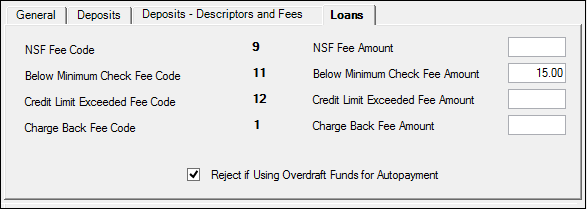
GOLD Services > Institution Options Screen, GOLD ExceptionManager Tab, Loans Tab
•Credit Limit Exceeded Fee Code
•Below Minimum Check Fee Amount
•Credit Limit Exceeded Fee Amount
•Reject if Using Overdraft Funds for Autopayment