Getting Started |
  

|
Navigation: »No topics above this level«
Getting Started |
|
Before you can begin using Help Desk, you need to set up security, sign on, and create a user record.
Help Desk is accessed through a Web browser. The website will be given to you at the time FPS GOLD brings you onto the system.
Firewall changes will also need to be made so that your institution can access this system:
•IP Address 172.27.29.62 Port 443
•IP Address 172.27.27.114 Port 443
Before you can use Help Desk, each user must be assigned a security system profile by your institution's security administrator. Users can be assigned to any of the following three system profiles found in CIM GOLD > Security > Setup:

•TicketUserSecurityGroup: All users must be assigned to this group before they can log onto the system. All users can see tickets, receive assignments, attach files to a ticket, and complete assignments.
•TicketUpdaterSecurityGroup: In addition to the permissions all users have, anyone in this group can also create a ticket, change the bank owner of a ticket, and attach files. Anyone in this group can also close any ticket they own.
•TicketAdminSecurityGroup: In addition to the permissions in the two groups above, anyone in this group can close any ticket. An Administrator can also assign users to be afterhours contacts and liaisons.
You can open Help Desk two ways:
•Directly from a Web browser by entering the URL for your institution.
•From within CIM GOLD: Other Applications > Browser Applications > Help Desk.
Before you can access the Help Desk from CIM GOLD, two conditions must be met:
1.Your institution must subscribe to the mini-application: Browser Applications. This is found in CIM GOLD under Security > Subscribe to Mini-Applications > Other Applications.
2.You must have security to access the Browser Applications (CIM GOLD Security > Setup > CIM GOLD > Other Applications > Browser Applications.
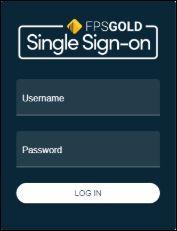
After you have security access to the TicketUserSecurityGroup, you can sign onto the Help Desk by entering your FPS GOLD credentials in the dialog box shown below.
Tip: Do not save the sign-on screen as a bookmark to your Favorites in your browser screen.
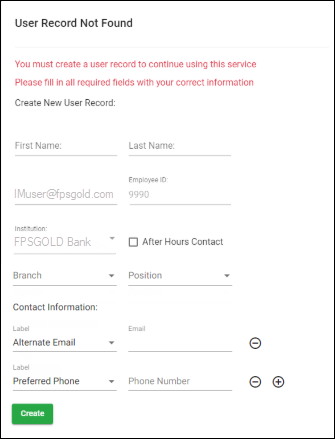
The first time you log onto Help Desk, the User Record Not Found dialog box will open with your email address, employee number, and institution in the appropriate fields (see the example below). You can then add other information to your user record in this dialog box to complete your record. When you have created your user record, you can perform all the tasks your user group allows you to perform.
To create your user record:
1.Enter your First Name and Last Name. This is required.
2.Your email address, if on the CIM GOLD security record, will default from CIM GOLD; otherwise, this information is needed for communications from the Help Desk system.
3.Your employee ID will default from the CIM GOLD security and cannot be modified by the customer.
4.Your institution name will default based on the URL accessed.
5.The After Hours contact check box should be marked by the institution Help Desk administrator.
6.If the administrator has set up branch names, select your branch location.
7.If the administrator has set up bank positions, select your position.
8.Contact Information can be used to enter the following: preferred phone, afterhours phone, work phone, cell phone, alternate email, and a note.
This information is used by FPS GOLD to contact the customer contact of a ticket, specifically when a ticket is given a priority of One, Severe Impact, or two, Critical Impact.
9.When you have finished entering information, click <Create>.
Tip: You can search in any drop-down list. To search, type the first letter of the item.
At any time after creating your user record, you can make changes to it. See Editing a Profile below.